Så använder du SpotPris
En komplett guide för att övervaka och spara på el
1. Visa elpriser
Börja med att välja ditt land (Sverige eller Norge) i navigeringsfältet. Välj sedan ditt elområde från rullgardinslistan för att se priser specifika för din region. Huvuddiagrammet visar timpriser för idag. Om morgondagens priser är tillgängliga (efter ~13:00 CET) kan du växla mellan idag och imorgon.
Du kan alltid byta elområde från rullgardinslistan utan att ladda om sidan. SpotPris sparar ditt val lokalt och väljer automatiskt rätt zon nästa gång du besöker.
2. Förstå prisdiagrammet
Stapeldiagrammet visar spotpriset i öre/kWh för varje timme under dygnet. Färgkodningen hjälper dig snabbt identifiera prisnivåer: grönt = billigt, gult = medel, rött = dyrt. Den aktuella timmen är markerad. Under diagrammet ser du dagens lägsta, genomsnittliga och högsta pris.
Håll muspekaren (eller tryck på en stapel på mobilen) för att se exakt pris för den timmen. Det aktuella elpriset visas också i realtid i statistikpanelen ovanför diagrammet.
3. Ställa in prisaviseringar
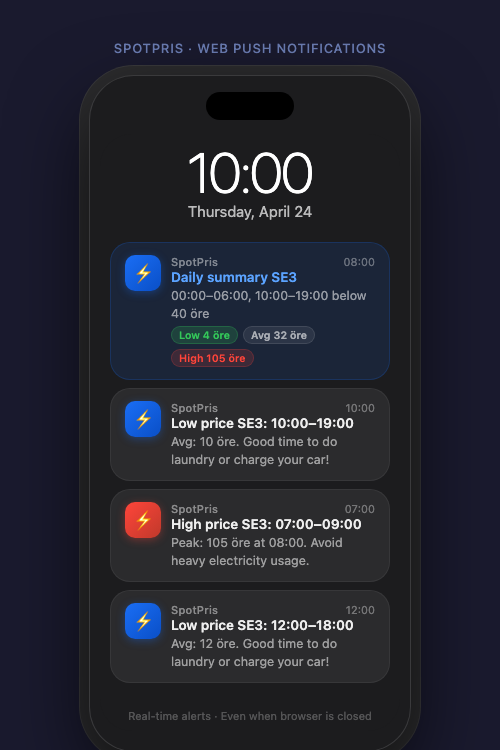
Klicka på Inställningar (kugghjulsikonen) för att konfigurera aviseringar. Du kan ange en gräns för högt pris (t.ex. 150 öre) för att få ett meddelande när priset överstiger det, och en gräns för lågt pris för att meddelas när elen är extra billig. Dagliga sammanfattningar skickar dig en fullständig prisoversikt vid din valda tid varje morgon.
Du kan ange tysta timmar (t.ex. 23:00–07:00) då inga realtidsvarningar skickas, oavsett pris. Det är särskilt användbart för SMS-aviseringar om du inte vill bli väckt på natten. Dagliga sammanfattningar kan konfigureras att bara skickas när priset överstiger din höga gräns.
4. Aviseringskanaler
5. Installera SpotPris som app (PWA)
iOS (Safari): tryck på Dela-knappen → "Lägg till på hemskärmen" → Öppna från hemskärmen.
Android (Chrome): tryck på menyn → "Lägg till på startskärmen" eller "Installera app".
När den är installerad fungerar SpotPris som en inbyggd app och stöder push-aviseringar även när du inte aktivt surfar.
SpotPris fungerar offline för att visa senast cachade priser. Push-aviseringar via PWA kräver att appen är installerad på hemskärmen (iOS kräver Safari). Android stöder full push utan extra installation.